The store will not work correctly when cookies are disabled.
Our website requires cookies to work correctly. Without cookies, we cannot track your shopping cart or receive your orders. We also use traffic log cookies to identify which pages are being used. This helps us analyze data about web page traffic and improve our website by better tailoring it to customer needs. We only use this information for statistical analysis purposes and then the data is removed from the system.
A cookie in no way gives us access to your computer or any information about you, other than the data you choose to share with us.
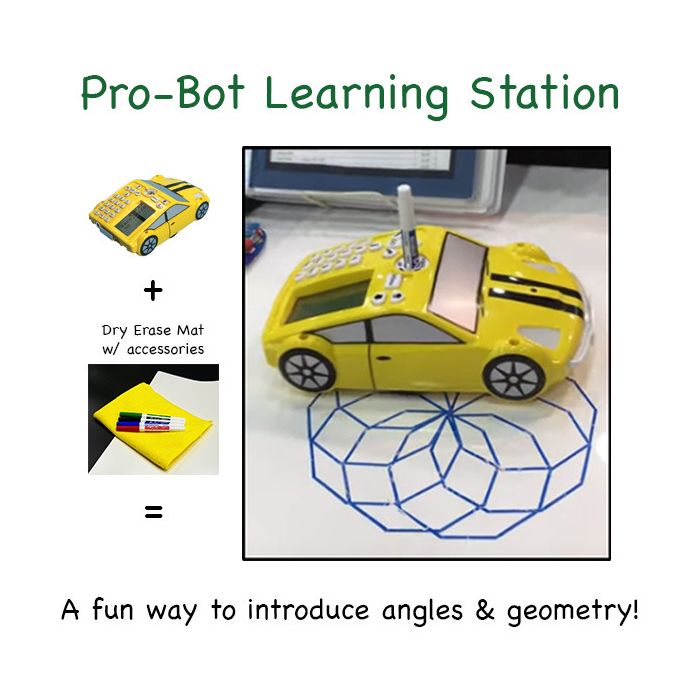
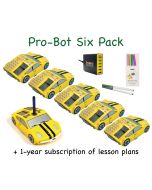
The Pro-Bot Learning Station combines Pro-Bot with a large Dry Erase Mat (with markers and a cleaning cloth). Use onscreen buttons to codePro-Bot to move and turn any distance or angle. Insert a marker and watchPro-Bot follow the commands and draw the design on the mat. If needed, wipe off the drawing and try again.
Pro-Bot motivates students to learn geometry and angles while developing coding and debugging skills. Multiple cost-effectivePro-Bot Learning Stations allow different teams of students to work on their projects at the same time.
The Dry Erase Mat's large surface is smooth to draw on, easy to clean, and comes with a set colorful markers and a washable cleaning cloth. When not in use, the Dry Erase Mat rolls up and stores in its own portable tube. Use it over and over!
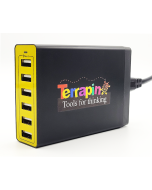
PLEASE NOTE – To preserve battery life, try not to leave robots and rechargeable accessories charging after they have been fully charged. Additional information about the rechargeable batteries in this product can be found on our Battery FAQ's page.
Pro-Bot Teaching Tools & Resources
CURRICULUM
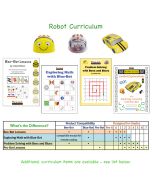
Pro-Bot Lessons – Get started with Pro-Bot using Pro-Bot Lessons, a step-by-step curriculum designed to introduce students to Pro-Bot and all its features. A series of Guided Explorations features teacher lessons, student activities, and video tutorials. The "Focus on Geometry" section helps students practice key geometry concepts, perfect for exploring with Pro-Bot. Lessons can be used in the classroom with actual Pro-Bots or online via the Pro-Bot Online Emulator.
>> Pro-Bot Lessons is available as a school-wide site license and as a 30-day free trial.
>> View a PDF of the Table of Contents
RESOURCES
Robot Resource Pages – Meet your robot, learn ways to use it in the classroom, and read articles relating to actual experiences. These pages bring together guides, tips, and support materials to help you get the most out of your robots. >> Visit the Pro-Bot Resources // Terrapin Resources Center >> Start with the Pro-Bot Robotics Guide. >> Continue your journey with the article After Pro-Bot Comes Logo! to discover what’s next in coding.
Terrapin's YouTube channel – Explore a growing library of Pro-Bot related videos. >> Have videos featuring Terrapin robots and accessories? We’d love to share them with the wider community—just fill out the Customer Contribution Form.
Social Media channels – Discover ideas, celebrate creativity, and stay connected with fellow educators inspiring our youngest learners. >> Follow us on Facebook (BeeBot.us) // Instagram (terrapin.tools.for.thinking)
Putting Skills to Practice
Pro-Bot Online Emulator – These fun apps let you program a virtual robot on any device that supports a browser. Choose any of Terrapin's Learning Mats as a surface to explore or set your own challenges with a blank surface. A great way to introduce Pro-Bot’s moves to a class before moving on to the floor robots individually.
"I absolutely love the online Pro-Bot Emulator. It has been a game changer for me when teaching my students how to use the Pro-Bots." ~ Heather Fox, Technology Specialist, Wrentham, MA – View her "Tips for Managing Your Pro-Bot Collection" customer story.
Turtle Tuesdays – A weekly programming challenge created for Terrapin Logo users, which often can be used with Pro-Bot, InO-Bot, and Kinderlogo. Each Tuesday, a new challenge is posted on Facebook (@BeeBot.us) and Instagram (terrapin.tools.for.thinking), with solutions released the following week on the Turtle Tuesdays page. All past challenges are archived there, along with links and solutions conveniently organized in the sidebar.
The challenges are designed to keep students engaged and thinking creatively. Younger learners can begin with simple designs, while older students tackle more advanced projects. As they experiment with new commands, students naturally make each challenge their own. These activities offer a fun, dynamic way to explore the Logo programming language—and the experience becomes even more rewarding when students collaborate.
Compare Accessories – Which accessories and curriculum products work with each robot? The comprehensive Accessories Chart has you covered.
>> See also the Using the Accessories page for tips on making the most of your robot accessories and creative ways to use them in the classroom.
Email Newsletters – Click HERE to sign up for one, two, or all three newsletters for practical lesson ideas, real teacher stories, helpful classroom tips, special offers, and the latest updates to support you throughout the school year.
Bee-Bot Buzz, sent bi-monthly during the school year, gives teachers practical guidance, lesson tips, and product updates for using Bee-Bot, Blue-Bot, and related STEM tools in the classroom. It showcases creative educator ideas and supports engaging, hands-on learning for young students.
Turtle Talk, sent bi-monthly, alternating its schedule with the Bee-Bot Buzz newsletter, highlights the latest news, tips, and tools for Logo programming and Terrapin’s educational robots and accessories. It keeps readers up to date on product developments, community stories, and practical guidance for teaching and learning with Logo and turtle robots.
Bee-Bot Insider delivers quick, useful updates only when there’s something new to share. Stay connected to the amazing Bee-Bot & Blue-Bot user community and be the first to hear about new Bee-Bot emulator mats, customer stories, and products for Bees and Blues. We’ll share teaching tips (maybe even yours!) and ask you how we can better support your coding adventures. Plus, enjoy periodic special offers just for Bee-Bot Insiders. – Note: archives are not available.