Blue Connection
Starting at $259.95
In stock
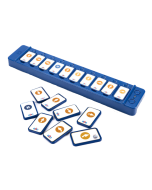
The Blue Connection - a combination Blue-Bot and a TacTile Code Reader - offers a hands-on, tactile way to explore programming and remote control.
Up to three TacTile Code Readers can be daisy chained together to allow up to 30 commands to be used in a row.
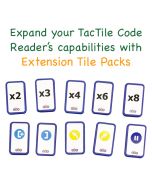
Special Offer! Order the Blue Connection bundle and get a free TacTile Code Reader Extension Tile Pack through December 31.
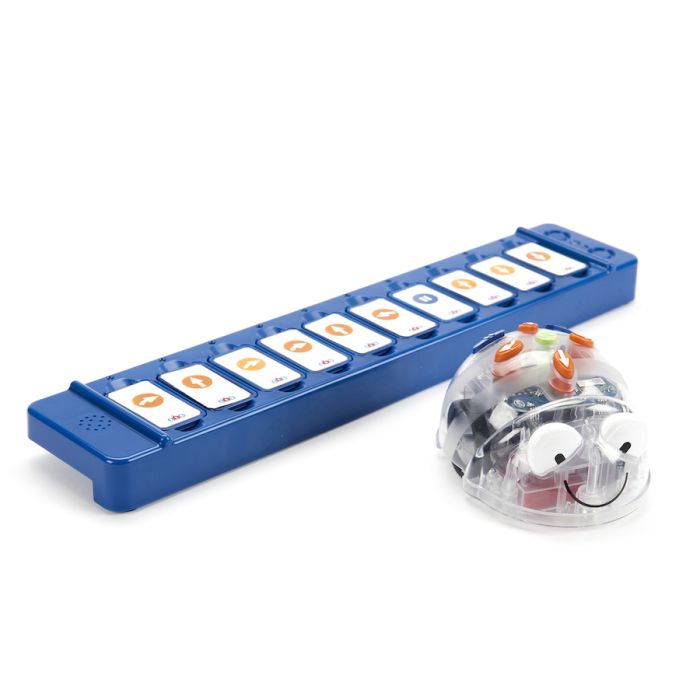
Terrapin's Blue Connection bundle includes:
• 1 Blue-Bot
• 1 TacTile Code Reader - includes 1 Standard Tile Pack in the box
• For a limited time - Order the Blue Connection bundle and get a free TacTile Code Reader Extension Tile Pack
There is also an Extension Tile Pack available (not usually included) which allows the TacTile Code Reader to program 45 degree turns and repeat functions. Purchase an additional Standard Tile Pack, an Extension Tile Pack, and/or an additional TacTile Code Reader at a discount with your bundle for an even greater savings!
Bee-Bot / Blue-Bot Teaching Tools & Resources
CURRICULUM
- Bee-Bot Lessons – Introduce young children to foundational coding skills—such as sequencing, directionality, and problem-solving—through the playful, accessible interface of Bee-Bot and Blue-Bot. With over 200 standards-aligned activities across the K–2 curriculum and differentiated instruction tips, teachers can easily adapt lessons for all learners. Integrate technology into math, science, literacy, social studies, the arts, and world languages while students build navigation, counting, geometry, patterning, and storytelling skills—making learning engaging and hands-on throughout the year. Bee-Bot Lessons is available as a school-wide site license and as a 30-day free trial.
- Problem-Solving with Bees and Blues – Engage students in hands-on, challenge-based activities that use Bee-Bot and Blue-Bot's 90° turns to build skills in routing, graphing, prediction, logic, sequencing, and collaboration. Students progress from creating simple paths to tackling complex routes tied to Cartesian coordinates, testing solutions with their robots for immediate feedback. The curriculum includes a teacher guide with clear objectives, 150 easy-to-print student challenges of varying difficulty, and a Student Record Form for tracking progress—empowering elementary learners to explore robotics, strengthen coding confidence, and turn problem-solving into an adventure. Problem-Solving with Bees and Blues is available as a school-wide site license and as a 30-day free trial.
- Exploring Math with Blue-Bot – Bring math to life through fun, standards-based activities that build essential K–3 skills. Ten scaffolded chapters lead students from counting and place value to measurement, graphing, geometry, and fractions—all through hands-on coding. The Teacher Guide provides strategies for differentiating instruction, and a Student Record Form helps track progress. The lessons were designed with Blue-Bot in mind, leveraging its unique 45° turn and repeat loop capabilities, but most lessons are also compatible with Bee-Bot, allowing students familiar with it to explore these expanded features online. Exploring Math with Blue-Bots is available as a school-wide site license and as a 30-day free trial.
- Storytime STEM+C Adventures – Combine literacy with coding for Pre-K–2 students. Choose from five different adventures that focus on science, engineering, or math, each with children’s books and a full set of materials for 24 students. Designed for use with Bee-Bot or Blue-Bot, these engaging activities are an effective way to build a solid foundation in language arts and computational thinking.
RESOURCES
- Robot Resource Pages – Meet your robot, learn ways to use it in the classroom, and read articles relating to actual experiences. These pages bring together guides, tips, and support materials to help you get the most out of your robots.
>> Visit the Bee-Bot Resources // Blue-Bot Resources // Terrapin Resources Center
>> Lessons to introduce your robot – Bee-Bot // Blue-Bot - Customer Stories – See how others are using Bee-Bot and Blue-Bot and other Terrapin-related technology.
>> Click here for guidance on how to share your story too!  Terrapin's YouTube channel – Explore a growing library of Bee-Bot and Blue-Bot related videos.
>> Have videos featuring Terrapin robots and accessories? We’d love to share them with the wider community—just fill out the Customer Contribution Form.- Social Media channels – Discover ideas, celebrate creativity, and stay connected with fellow educators inspiring our youngest learners.
>> Follow us on Facebook (BeeBot.us) //
  Instagram (terrapin.tools.for.thinking)
EXTRA CURRICULAR
- Fun at Home with Bee-Bot and Blue-Bot – Activities to help young learners get the most out of engagement at home.
Putting Skills to Practice
- Online Emulators – These fun apps let you program a virtual robot on any device that supports a browser. Choose any of Terrapin's Learning Mats as a surface to explore or set your own challenges with a blank surface. A great way to introduce Bee-Bot and Blue-Bot’s moves to a class before moving on to the floor robots individually.
>> Visit the Bee-Bot Online Emulator // Blue-Bot Online Emulator
>> Teacher-Created Mats – Try some fun Bee-Bot mats that educators have made for you and your students to use.
>> Monthly Emulator Mats – Explore a new calendar mat every month.